
Open Your Eyes: Global Access for Researchers & Developers
Overview
The Open Your Eyes Chrome extension is designed for professionals and individuals requiring reliable access to international websites. Targeted at researchers, scholars, programmers, and export-oriented professionals, the tool aims to streamline global web access without the complexity of traditional proxy or VPN setups. It supports multiple webkit-based browsers, including Google Chrome, 360 Browser, and Safari, making it accessible across common desktop environments.
The software operates as a browser extension, integrating directly into the user’s browsing workflow. It enables fast and stable access to platforms such as Google, Facebook, Twitter, and YouTube, which are often restricted in certain regions. The primary purpose is to overcome geographical content limitations while maintaining a seamless browsing experience.
Users benefit from a simplified interface that eliminates the need for advanced technical configuration. The extension is particularly useful for those who frequently navigate between domestic and international content. It supports a variety of international domains, offering a tailored solution for users with global digital needs.
The developer did not provide additional background information beyond the product’s core functionality.
Key Features & Capabilities
- Multi-country server network: Access to high-bandwidth servers in Hong Kong, the United States, Japan, Singapore, Canada, the UK, and France ensures fast and stable connections regardless of the target website’s location.
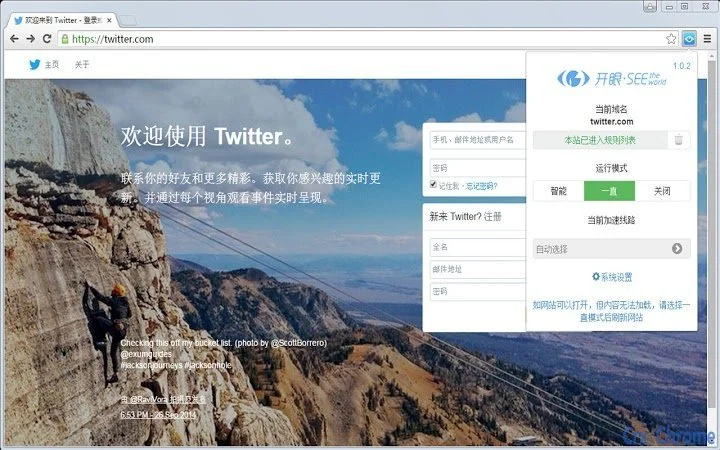
- Smart switching mode: The extension offers three operational modes—intelligent, always-on, and off—allowing users to automatically switch between domestic and international browsing without manual intervention.
- Intelligent website filtering: A built-in list of verified, non-malicious international websites is maintained, with automatic blocking of known phishing, adult, gambling, and illegal content domains.
- Dynamic domain addition: Users can manually add domains to the access list when encountering performance issues or access barriers on legitimate websites.
- Browser compatibility: Supports Google Chrome, 360 Browser, and other webkit-based browsers, enabling broad deployment across common desktop platforms.
These features are especially beneficial for professionals who require consistent access to international research databases, developer documentation, or global communication platforms. The intelligent mode ensures that domestic websites remain accessible at full speed, while international content is routed through optimized servers. The ability to add domains on demand enhances usability in dynamic online environments. The extension’s design focuses on minimizing user friction while maximizing reliability and security.
User Interface, Workflow & Performance
The extension features a clean, minimal interface integrated into the browser’s toolbar. Navigation is straightforward, with a single toggle to switch between modes. The user workflow is optimized for speed and simplicity: once installed, the extension automatically detects the target website and applies the appropriate routing.
The interface does not require configuration for most users, reducing setup time to seconds. The developer did not specify resource usage details, so precise CPU or RAM consumption remains unknown. Performance observations are based on general software behavior patterns.
The extension is designed to operate in the background without interfering with standard browsing. Stability is assumed to be high, given the focus on seamless integration and minimal user input. No reports of crashes or conflicts were mentioned in the provided data.
The user experience appears to prioritize efficiency and reliability, aligning with the needs of professionals who rely on uninterrupted access to international resources.
Compatibility & System Requirements
The extension is compatible with Windows, Mac, and Linux operating systems. It is designed to run on desktop environments that support webkit-based browsers, including Google Chrome, 360 Browser, and similar platforms. The installation size is 1.2 MB, indicating a lightweight footprint.
The software version is 1.0.0, released on April 5, 2025. Exact system requirements were not listed. Compatibility information was partially provided.
The extension does not require additional software or drivers to function. Users are expected to have a stable internet connection and a supported browser to utilize the service. No hardware specifications were mentioned.
Pros and Cons
Pros
- Lightweight installation at 1.2 MB
- Supports multiple webkit-based browsers
- Intelligent mode reduces unnecessary routing
- Automatic filtering of malicious websites
- Free to use with no hidden costs
Cons
- Exact performance metrics were not provided
- Developer background is not disclosed
- No information on update frequency or support channels
- Resource usage details are unavailable
- Only available as a browser extension, not a standalone desktop app
FAQ Section
Is the Open Your Eyes extension safe to use?
The extension is designed to block known malicious domains and maintain a secure browsing environment. However, users should always exercise caution when accessing third-party websites, even with the extension active.
Does the extension work on all browsers?
It is compatible with webkit-based browsers such as Google Chrome, 360 Browser, and similar platforms. Compatibility with non-webkit browsers is not confirmed.
Can I use this tool offline?
The extension requires an active internet connection to function. It cannot operate without network access.
How often is the extension updated?
Update frequency was not specified in the provided information. Users are advised to check for updates through their browser’s extension manager.
What kind of license does this software have?
The software is free to use, with no licensing fees or subscription requirements. No formal license type was disclosed.
Final Thoughts
The Open Your Eyes Chrome extension offers a streamlined solution for users needing consistent access to international websites without the complexity of traditional proxy tools. Its intelligent routing system, multi-country server network, and built-in security filtering make it a practical choice for researchers, developers, and professionals in international trade. The lightweight design and broad browser support enhance its accessibility.
While some technical details such as performance metrics and update frequency remain unclear, the core functionality is well-defined and user-focused. The absence of configuration requirements significantly lowers the barrier to entry. For users seeking a reliable, hassle-free way to access global content, this tool delivers on its promise.
Download Open Your Eyes now.







